Most businesses stop tracking Google Ads leads at the enquiry. Google sees a call or a form, counts a conversion, and has no idea whether that person became a £90 job, a £9,000 job or nothing at all. For a service business, that blind spot is expensive: the system keeps finding more people like your enquirers, not more people like your customers.
Closing the gap means connecting three things: the ad click, your CRM or job management system, and the outcome of each lead. This guide shows how to build that pipeline, step by step.
The pipeline at a glance
| Stage | Where it lives | What Google receives |
|---|---|---|
| Click | Google Ads (GCLID) | Click data |
| Enquiry | Website form / call tracking | Online conversion |
| Qualified lead | CRM stage | Uploaded offline conversion |
| Booked job / won quote | CRM stage | Uploaded offline conversion |
| Revenue | CRM / invoicing | Conversion value (and adjustments) |
Step 1: capture the click ID with every enquiry
With auto-tagging on, every Google Ads click adds a GCLID parameter to your landing page URL. Your job is to keep it attached to the lead.
- Forms: add a hidden field called gclid. A small script reads the value from the URL (and stores it in a first-party cookie, so it survives page changes) and fills the field on submit.
- Calls: use a call tracking tool that records the GCLID with the call, or rely on Google's call conversions for calls from ads.
- CRM: create a GCLID field on the lead or contact record and make sure your form integration maps to it.
Also capture source, campaign and keyword (UTM parameters) in the CRM. Even without uploads, that lets you report revenue by campaign.
Step 2: define stages your team actually uses
Tracking fails when stages are vague. Agree definitions everyone can apply consistently:
| Stage | Example definition |
|---|---|
| Qualified lead | In area, service we offer, contactable, genuine need |
| Quote sent | Price given in writing or after a survey |
| Booked / won | Customer accepted; job scheduled |
| Lost | Declined, no response after three attempts, or booked elsewhere |
Most CRMs used by trades (and plenty of spreadsheets) can hold these as a pipeline or status field.
Step 3: create matching conversion actions in Google Ads
Create "Import from clicks" conversion actions for each stage you want Google to see, for example "Qualified lead" and "Booked job". Keep the website form and call conversions as well, but decide which are primary.
Rule of thumb: make the deepest stage that happens at least 20 to 30 times a month the primary goal. If you book 40 jobs a month from ads, use "Booked job". If you book eight, use "Qualified lead" as primary and report booked jobs as secondary.
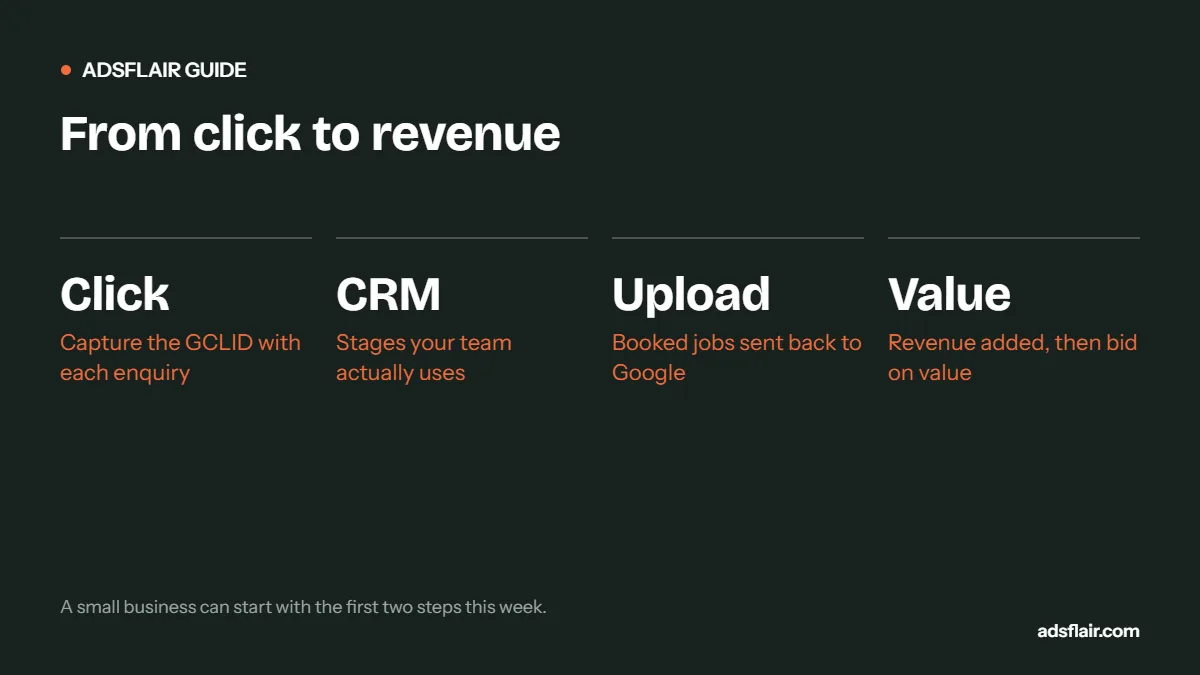
Step 4: upload on a schedule
Source: Google Ads Help, Offline conversion imports FAQs.
Google recommends uploading daily where possible, or on a consistent schedule such as every two days or weekly. Options, from simplest to most robust:
- Manual CSV upload weekly from a spreadsheet: GCLID, conversion name, time, value.
- Scheduled upload from Google Sheets or an SFTP file.
- Native CRM integrations or connectors such as Zapier, which push each status change automatically.
Step 5: no GCLID? Use enhanced conversions for leads
Phone leads, walk-ins and leads re-entered by hand often lose the click ID. Enhanced conversions for leads match hashed email addresses or phone numbers from your CRM to the person who clicked the ad. It needs consent-aware tagging on the site and a lawful basis to use the data, but it recovers many conversions a GCLID-only setup misses.
Step 6: add revenue, then bid on value
Upload the job value with each booked job. If the final invoice differs from the quote, send an adjustment within the 55-day window. Once values are flowing for a few weeks, you can report return on ad spend by campaign and test value-based bidding, so Google favours searches that lead to bigger jobs.
Do the same for Meta
If you run Facebook or Instagram ads, send the same CRM stages to Meta through its Conversions API. Lead forms and website leads can both be updated with status changes, and campaigns can then optimise towards leads that progress.
What it changes in practice
Here is a typical before-and-after view of one month, once outcomes are connected:
| Campaign | Leads | Booked | Revenue | Spend | Revenue per £1 |
|---|---|---|---|---|---|
| Emergency repairs | 48 | 21 | £5,040 | £1,100 | £4.58 |
| Installations | 14 | 4 | £13,600 | £900 | £15.11 |
| Servicing | 22 | 15 | £1,650 | £300 | £5.50 |
Illustrative example, not a benchmark.
On lead count alone, installations look like the weakest campaign. On revenue, it is the strongest by a distance. Without the pipeline, most businesses would cut the wrong one.
Common problems
- GCLID lost on redirects or by cookie banners blocking the script: test with a real ad click.
- Leads entered manually without the GCLID: add the field to your intake process or rely on enhanced conversions.
- Uploads failing silently: check the upload diagnostics in Google Ads after each run.
- Stages used inconsistently by different staff: write the definitions down and review monthly.
For the first steps, read Google Ads conversion tracking for local service businesses and Google Ads call tracking, or see our web analytics and conversion tracking service.
A minimal setup for small businesses
You do not need an expensive CRM to start. A small trade business can get most of the benefit with:
- a hidden GCLID field on the website form, sent with the enquiry email;
- a shared spreadsheet with one row per enquiry: date, GCLID, source, qualified, booked, value;
- a weekly manual upload of booked jobs to a Google Ads "Import from clicks" conversion action.
That takes about 20 minutes a week once it is running, and it is enough to start reporting cost per booked job by campaign.
Data to keep for each lead
| Field | Why |
|---|---|
| GCLID | Matches the lead to the ad click for upload |
| Source / medium / campaign (UTMs) | Reporting by channel and campaign without uploads |
| Landing page | Shows which pages produce valuable leads |
| Email and phone | Enhanced conversions matching when no GCLID exists |
| Stage and date changed | Upload timing and pipeline speed |
| Job value and gross profit | Revenue reporting and value-based bidding |
How long until bidding improves?
Expect a few weeks. Google needs enough uploaded conversions to learn from, and because uploads arrive after the click, there is always a delay. If you switch the primary goal from enquiries to booked jobs, do it gradually: report booked jobs as secondary for a month, check the numbers line up with your records, then promote them. Sudden switches can cause cost per lead to jump while bidding adjusts.
Frequently asked questions
How do I connect Google Ads to my CRM?
Capture the GCLID from each ad click in a hidden form field, store it on the CRM lead record, then upload stage changes such as qualified or booked to matching "Import from clicks" conversion actions in Google Ads.
How long after a click can I upload an offline conversion?
Up to 90 days for GCLID-based conversions. Enhanced conversions for leads using hashed customer data have a 63-day window.
Which CRM stage should be my primary conversion?
The deepest stage that happens often enough, roughly 20 to 30 times a month. If booked jobs are fewer than that, use qualified leads as primary.
Can I track revenue from Google Ads leads?
Yes. Upload the job value with booked-job conversions and adjust it if the final invoice changes, within 55 days. You can then report return on ad spend and test value-based bidding.
Related guides
- Google Ads Conversion Tracking for Local Service Businesses
- Google Ads Call Tracking: Which Keywords Bring Jobs?
- £50 vs £100 Google Ads Lead: Which Makes More Money?
Sources
- Google Ads Help: Offline conversion imports FAQs
- Google Ads Help: Set up offline conversions using Google Click ID (GCLID)
Want to see revenue, not just leads, in Google Ads?
Ask for a free Google Ads review. We will check how your enquiries reach your CRM and map out the simplest way to send booked jobs back to Google. You can also see how we run PPC tracking and reporting.
Get My Free Google Ads Reviewor book a 30-minute call or message us on WhatsApp